
Consider a hypothetical course editor. An AI company announces a model change or gives some users a fresh allowance. The editor opens last month’s lesson and sees the same model name, the same usage-limit advice and the same click path that suddenly look old.
The temptation is to announce an “updated edition” before the attention disappears. That is usually the wrong first move. A social post can be real and still be a poor maintenance instruction. OpenAI’s current guidance says Codex usage limits vary by ChatGPT plan. A screenshot of one account therefore cannot become a permanent line in a lesson.
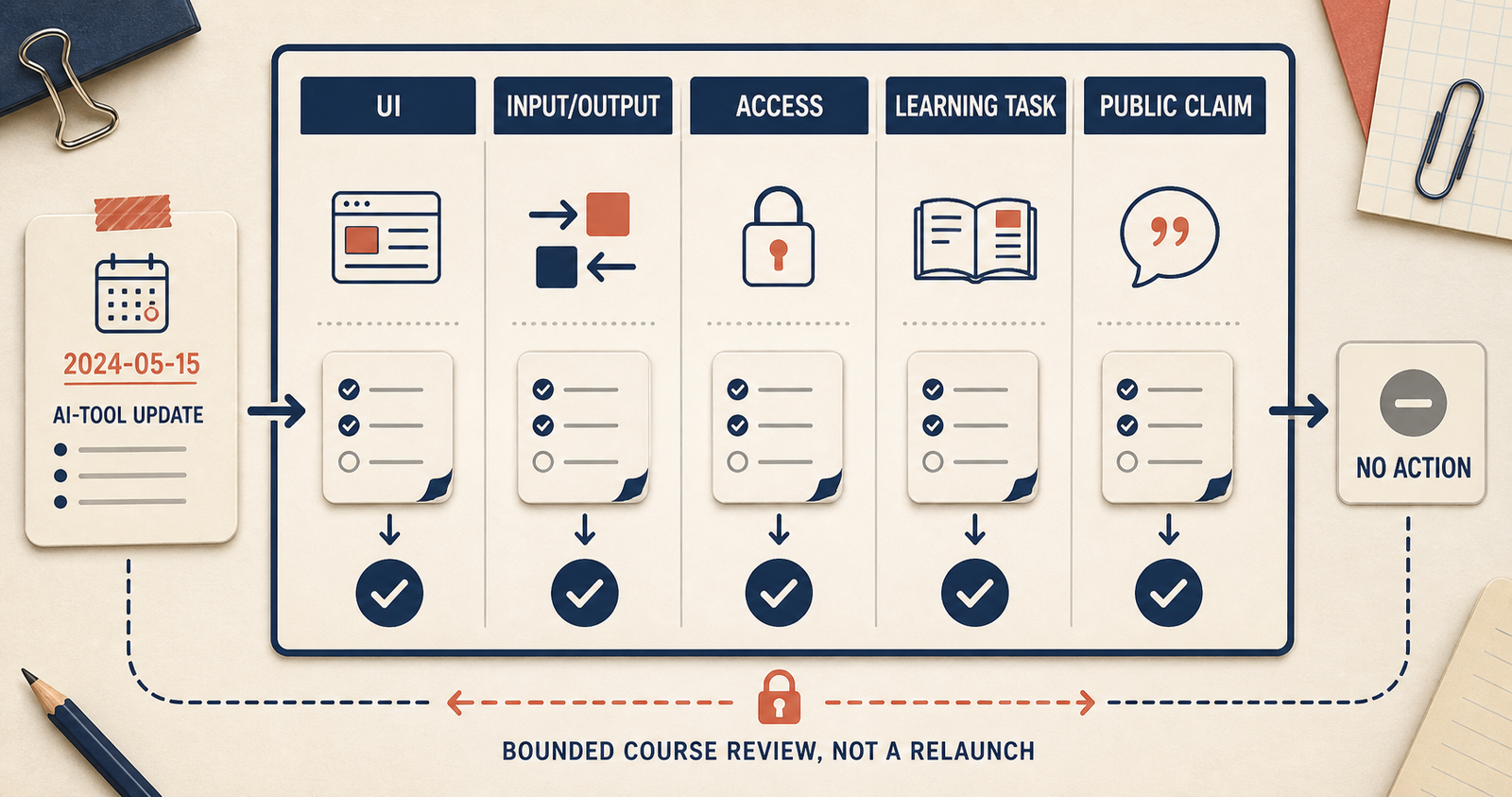
The better response is modest: open a review ticket. Ask what actually changed, where the course depends on it, and whether the consequence is a screenshot edit, a learning-task redesign, an access test, a wording correction—or no action at all.
That distinction matters especially for a China-facing course. The original lesson may depend on a global product, while the adapted workflow uses DeepSeek, Model Studio or Volcengine Ark as an example or alternative path. Both sides can change. Translation is only one asset; the learner is buying a workflow that still has to exist when the lesson is opened.
Quick answer
No. A model update or usage reset is not automatically a reason to rebuild a course. It is a reason to test whether the workflow the learner bought still exists. First classify the change as a product allowance, API rate limit, model migration, feature change or access difference. Then inspect the exact lesson dependency. Only learner-facing breakage justifies an urgent edit.
First identify what changed
The word “limit” hides several different problems. Treating them as one is how course support pages become unreliable.
| What changed | Evidence to inspect | Typical course action |
|---|---|---|
| Product allowance or reset | The learner’s plan and current account UI, plus the provider’s help page | Remove fixed universal claims; document the observed plan and date |
| API rate limit | Response headers, request ID, HTTP status and provider documentation | Add logging, retry or queue guidance; do not rewrite it as a ChatGPT allowance |
| Model migration | Official model ID, migration date and compatibility notes | Retest example requests, outputs and tool calls before changing the lesson |
| Feature or plugin update | Official release note and the current account surface | Check whether the exercise depends on the feature or only shows it |
| Access difference | Actual learner role, account, region and purchase path | Run an access and delivery test; do not infer availability from documentation |
This classification turns a popular announcement into a useful maintenance decision. It also prevents a common category error: ChatGPT product usage, an API’s request limits and a Chinese cloud endpoint’s throughput controls are not the same thing.
What a changelog can tell you—and what it cannot
Official documentation is useful because it separates product surfaces that a casual reading tends to blur. OpenAI’s API documentation exposes operational signals such as rate-limit headers and request identifiers; that supports engineering diagnosis, not a claim about a ChatGPT subscriber’s allowance. DeepSeek publishes model-update and rate-limit documentation. Alibaba Cloud documents model-level QPM and TPM controls, while Volcengine maintains model-release, retirement and burst-traffic guidance.
Those pages establish that version drift and traffic controls are real maintenance objects. They do not prove that a given account can use a feature, that a tool behaves identically in every workflow, that Chinese learners prefer it, or that the change belongs in your course. A changelog cannot replace an access test, a learner test, or a rights review.
That is why “the tool changed” is a poor editorial conclusion. It is only the opening fact for a narrower question: what does this change touch in the learning asset we actually maintain?
Start with a one-page review ticket
Do not begin by rewriting slides. Open a short record with six fields:
| Field | Record it this way |
|---|---|
| Source note | The exact official page, date observed and wording that changed |
| Course dependency | The lesson, screen, transcript, exercise or public claim that mentions the surface |
| Change class | UI, input/output, access assumption, learning task, or public claim |
| Risk | What a learner could misunderstand if nothing changes |
| Proposed action | No action, annotate, edit asset, retest path, or pause the claim |
| Owner and evidence | Who decides, and what evidence closes the ticket |
This is smaller than a product roadmap. It stops an unverified update spreading as “everything may be outdated.”
A constructed example
Imagine a 45-minute lesson that teaches a team to prepare a narrated video recap. The lesson includes a screenshot of a subtitle-template form. A public update says that the form now includes a speaker-related field.
The review ticket should not say, “New capability added; relaunch module.” It should ask:
- Does the old screenshot still let a learner complete the stated exercise?
- Does the new field change the required input or expected output?
- Does the narration claim the old field list is exhaustive?
- Has anyone tested the current path in the relevant account and role?
- Is the lesson teaching a transferable review method, or merely a click sequence?
If the answer is “the new field is optional and the exercise remains intelligible,” the right action may be a small screenshot annotation at the next normal update. If the new field changes the learner’s required output, the exercise needs review. If nobody has tested access, do not convert the changelog into an availability claim.
This is a constructed scenario, not an OriBridge client result or a claim about any named tool’s current eligibility.
Route the change through five lanes
The same update can require very different work depending on what it touches. Use these five lanes before approving a course edit.
1. UI lane: does a screen now mislead?
This lane covers renamed buttons, rearranged menus, a new optional field, or visual changes in a course screenshot. The practical question is not whether the page looks newer. It is whether a learner will fail the lesson’s stated action because the screen is misleading.
If the course says “click the blue button in the lower right,” a moved button may matter. If the screen is only illustrative and the lesson teaches a broader review method, a dated caption may be enough. Do not rebuild a concept lesson just because the pixels moved.
2. Input/output lane: did the work itself change?
Some updates alter what goes in, comes out, or must be checked. A new source field, a different export format, or a changed retrieval return can affect an exercise even when the interface looks familiar.
Alibaba Cloud’s workflow documentation is relevant here because it distinguishes several components rather than treating a workflow as one black box. When a component changes, ask which artifact in the lesson depends on it: a source file, a prompt, an API response, an evaluation rubric, or an example output. The review is about the dependency, not the brand name.
3. Access lane: has an assumption quietly appeared?
Tool documentation sometimes creates an accidental promise in course copy. An editor reads a public page, adds “learners can use X,” and a feature page becomes a claim about access.
Keep this lane strict. A documented feature can justify a question to test; it cannot prove that an overseas learner, a particular organisation, or a particular course cohort can obtain and use it. When an access assumption is central to the lesson, route it to the end-to-end access, payment and delivery test instead of editing the claim optimistically.
4. Learning-task lane: does the exercise still teach the same judgment?
This is the lane teams miss when they only update screenshots. A new tool control may make the old sequence impossible, but it may also reveal that the exercise was too tied to a particular interface in the first place.
Volcengine’s documentation distinguishes tool surfaces such as function calling and retrieval. That distinction is a useful teaching prompt: can the learner identify which surface is being used, state the input, inspect the output and notice failure conditions? If yes, the task can often survive an interface change. If the exercise only tests whether someone can reproduce a five-click path, the course may need a deeper redesign.
5. Public-claim lane: is the website now saying more than the evidence?
The final lane is external copy: course descriptions, landing pages, blog posts and comparison tables. Remove or pause claims that are no longer narrowly supported. “This lesson uses a documented workflow surface” is different from “this tool is available to your team” or “the updated feature makes the course better.”
When a claim needs an external test or user evidence, label it as unverified rather than filling the gap with a feature announcement.
Three outcomes are enough
A good review process does not reward the biggest edit. It produces one of three explicit outcomes.
No learner-facing change. The change is recorded, but it does not affect the defined lesson, its assets or its public claims. This is a valid result, and it prevents frantic maintenance theatre.
A bounded edit. Update one screenshot, a term, an exercise instruction or a version note. The ticket should identify the source asset and the check used to confirm the correction.
A pause and a test. The change affects a required dependency, an access assumption or a learner task, but the team lacks evidence to redesign safely. Pause the affected claim or lesson segment until a controlled test can be performed.
The pause is not a failure. It is an honest way to avoid turning a changelog into an unsupported course promise.
Do not use changelogs as a news calendar
There is a tempting content-marketing pattern: every product update becomes a blog post, newsletter or “China AI update” list. This creates the appearance of freshness but often leaves readers without a decision. A China AI tool radar decides whether an external update deserves a dated record; this article begins later, after that record touches a named course asset and someone must close the maintenance decision.
Use a public update as news only when you can explain the reader’s practical consequence and the evidence for it. Otherwise, keep it in the internal review record. The reader does not need to know that a page changed; the reader needs to know whether their course asset, workflow or assumption needs attention.
This is also why a tool radar should not be a launch list. A course dependency and terminology inventory gives each dependency a place to be named, while a localization readiness checklist makes missing inputs visible before an adaptation begins. Neither document turns a public feature note into a market result.
The counterexample: a fixed historical lesson
Not every course should chase updates. A fixed historical lesson may deliberately show a past interface because the aim is to explain how a decision was made at that time. A recorded conference session may be preserved as an archive rather than maintained as current instruction. In those cases, a short version label and a clear “recorded in” date can be more honest than constant edits.
The key is to avoid presenting a fixed lesson as a live operating manual. If the product promise is “current click-by-click instruction,” maintenance obligations are different. If the promise is “a durable way to evaluate an AI workflow,” the course can often keep a stable core while treating interface changes as examples to review.
The maintenance rule worth keeping
Here is the sentence a course team can reuse: a changelog should trigger a question about your course dependency, not an automatic claim about your course.
Before publishing any update, make sure you can answer three things: what changed in the official record; what it changes, if anything, in the actual learning asset; and what evidence supports the action you are taking. If the third answer is missing, open a review ticket and stop there.
If you are adapting an expert product whose tool dependencies, screenshots and teaching tasks need a bounded review before a China-market test, request a China validation review.
Sources and evidence boundary
- OpenAI, Using Codex with your ChatGPT plan, checked 2026-08-25. It explains that Codex usage limits vary by ChatGPT plan; it does not establish a permanent allowance for every account.
- OpenAI API reference, Debugging requests and rate-limit headers, checked 2026-08-25. It supports logging API rate-limit headers and request identifiers; it does not describe ChatGPT product allowances.
- DeepSeek API updates and rate-limit documentation, checked 2026-08-25. They support model migration and account-level concurrency as maintenance dependencies; current names and limits are not permanent guarantees.
- Alibaba Cloud Model Studio model rate-limit documentation, checked 2026-08-25. It supports QPM and TPM as model-level deployment variables; its examples are not universal account quotas.
- Volcengine Ark documentation and burst-traffic guidance, checked 2026-08-25. They support release, retirement and traffic-management surfaces as dependency-review inputs; they do not prove suitability or availability for a particular learner.
- Alibaba Cloud Model Studio workflow application documentation, checked 2026-08-24. It distinguishes workflow components such as models, APIs, knowledge bases, MCP and inputs/outputs; it does not establish access or learning value.
- Volcengine Ark tool-calling documentation, checked 2026-08-24. It describes distinct tool surfaces; it does not establish a course use case, eligibility or outcome.